
What Are Agent Skills? How Reusable AI Workflows Are Changing the Way Kansas City Businesses Operate
Agent Skills are pre-built, reusable packages of instructions, scripts, and resources that teach an AI system exactly how to complete a specific task. Think of them as saved playbooks: instead of rebuilding an automated workflow from scratch every time, an Agent skill stores the complete set of instructions once and executes them on demand, consistently, across all of your connected business tools.

Quick Answer
Agent Skills are reusable folders of instructions, scripts, and resources that teach Claude how to handle specific business tasks according to your standards, then load automatically whenever that task comes up.
- Packaged expertise: A Skill captures your business-specific workflows, communication standards, and output formats so Claude applies them consistently, every time, without being re-instructed.
- Dynamic loading: Claude scans available Skills while working and loads only the ones relevant to the current task automatically, no manual selection required.
- Works across your tools: Combined with MCP connectors, Skills apply your business intelligence across your CRM, email platform, accounting software, and scheduling tools simultaneously.
- Reusable across your team: Once a Skill is built, every person in your organization gets the same consistent output, eliminating variability from whoever happens to be typing the prompt.
How Do Agent Skills Actually Work?
An Agent Skill is a folder containing three things: instructions that define how a task should be handled, scripts that execute specific actions, and resources like templates or reference materials the AI needs to do the job correctly. The AI scans available skills while working, loads only the ones relevant to the current task, and applies them automatically without any manual selection required. Anthropic, Introducing Agent Skills, October 2025
The analogy Anthropic uses internally is useful here. Building a skill is like writing an onboarding guide for a new hire. You document exactly how your business handles a specific type of work, what standards apply, what tools are involved, and what a good output looks like. Once that guide exists, the AI references it every time that type of work comes up, consistently, without being reminded.
This is what separates Skills from simply typing instructions into a chat window every time you need something done. A one-off prompt disappears after the conversation ends. A skill is permanently available, loads on demand, and produces consistent results across every person on your team who uses it.
Skills are also composable, meaning multiple skills can work together on the same task. If your business has a skill for following your email tone guidelines and a separate skill for qualifying leads, the AI coordinates both automatically when handling a new inbound inquiry. You do not manage which skill to use. The AI identifies what is needed and applies it. Anthropic, Introducing Agent Skills, October 2025
For Kansas City SMBs, the practical implication is straightforward. Every time a staff member currently stops to explain context to an AI tool, re-enters the same instructions, or manually checks that the output matches your business standards, that friction disappears once the relevant skill exists. The knowledge lives in the skill, not in whoever happens to be typing the prompt that day.
Agent Skills + MCP Connectors
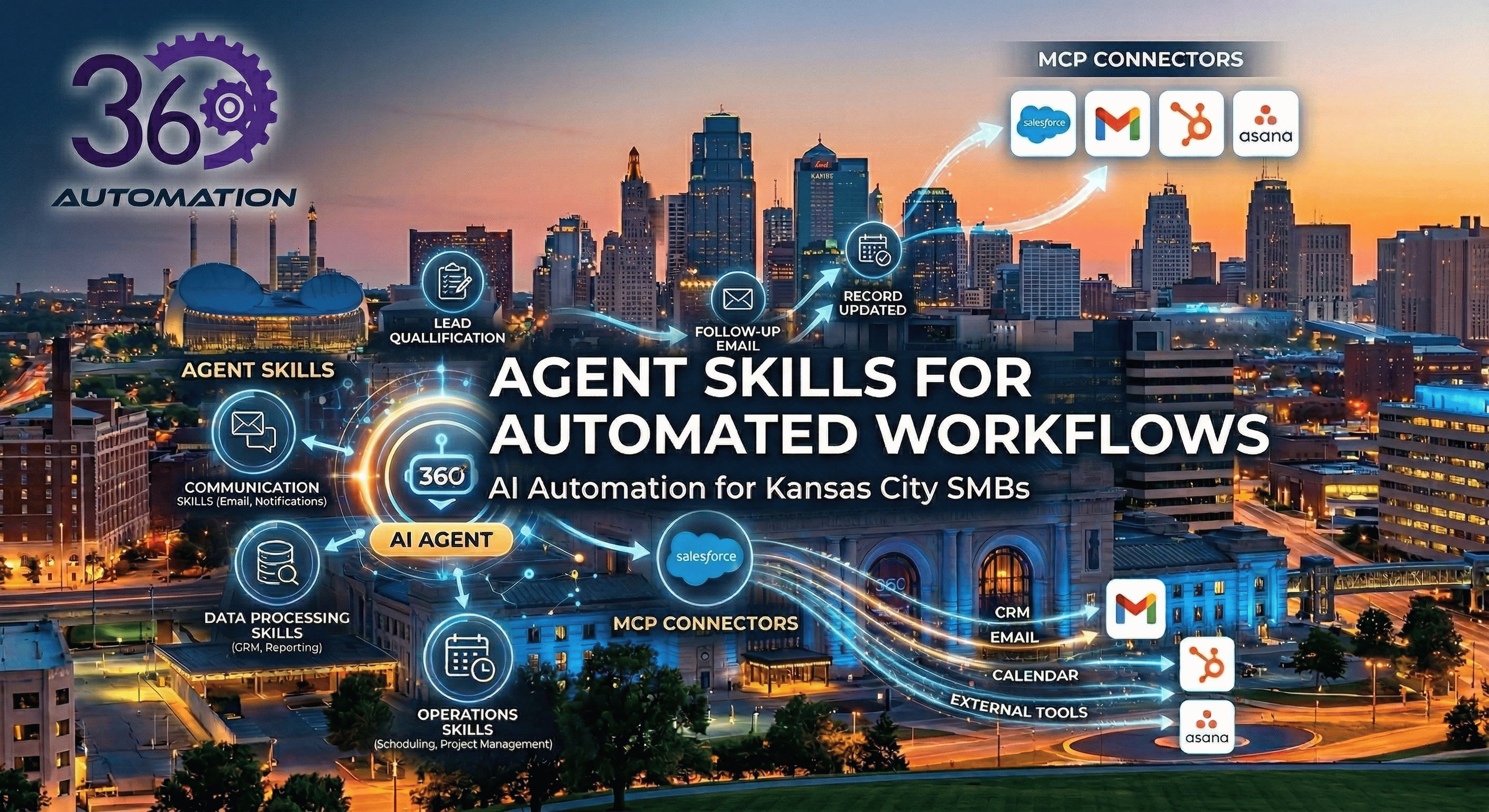
When Skills are combined with MCP connectors, they form a complete automation stack: MCP handles the connections to your external tools and data, while Skills provide the business-specific intelligence for how to use those connections. Neither works as powerfully without the other.
MCP is an open standard for connecting AI assistants to external systems where data lives, including content repositories, business tools, databases, and development environments. Skills then provide the context Claude needs to use those connections effectively, teaching Claude when to query your CRM, what to look for in the results, how to format the output, and which edge cases require different handling. Claude
Anthropic describes the relationship with another useful analogy:
- MCP is like having access to the aisles of a hardware store.
- Skills are like the helpful employee who walks you through the repair process, points you to the right supplies, and shows you proper technique.
The inventory is only useful if someone knows how to use it correctly. For Kansas City SMBs, this combination unlocks workflows that neither tool can accomplish alone. Here is what that looks like in practice:
Without MCP: A Skill can apply your business standards and judgment to any task Claude can see, but it cannot reach into your CRM, pull from your accounting software, or update records in your project management tool without a connection established first.
Without a Skill: An MCP connector gives Claude access to your tools, but Claude will use them generically, without your specific qualification criteria, your communication standards, your routing logic, or your output formats applied consistently.
Together: MCP connections activate so Claude can search your systems and pull relevant data, while Skills engage to provide the analytical framework and business-specific procedures. The result is a workflow that draws from multiple data sources, follows your defined process, and produces consistent outputs that reflect how your business actually operates. Claude
A concrete example for a service business: an MCP connector links Claude to your CRM, your email platform, and your scheduling tool. A Skill defines exactly how your business qualifies a new inbound lead, what a follow-up email should say, and how appointments should be booked based on service type and availability. When a new inquiry arrives, the combination reads the inquiry via MCP, applies your qualification criteria via the Skill, drafts a response in your brand voice, and books the appointment directly into your calendar. The entire sequence runs without a staff member touching it.
What Types of Agent Skills Are Most Valuable for Kansas City SMBs?
The highest-value Agent Skills for SMBs fall into four categories: communication, data processing, operations, and customer engagement. Each category targets a distinct area where manual effort is costing your team time and your business money.
1. Communication Skills
These skills handle the outbound and inbound communication workflows that currently require a staff member to draft, review, send, or respond to messages manually.
- Drafting personalized email responses based on the content and context of inbound messages.
- Sending appointment confirmations, reminders, and follow-up sequences without staff involvement.
- Routing inbound inquiries to the correct team member based on topic, urgency, or customer type.
- Executing lead follow-up cadences across email and text after a form submission or inquiry.
2. Data Processing Skills
These focus on extracting, moving, and logging information across your business systems—the category of work most directly tied to costly human error.
- Extracting key fields from invoices, contracts, intake forms, and receipts.
- Updating CRM records automatically after calls, emails, meetings, or completed transactions.
- Flagging inconsistent or missing data for human review before it causes downstream problems.
- Pulling data from multiple sources and generating structured weekly or monthly reports.
3. Operations Skills
These skills manage the internal coordination tasks that are invisible until they are missed.
- Triggering onboarding checklists and document requests when a new client is added to your system.
- Monitoring inventory levels and sending reorder alerts when thresholds are reached.
- Tracking expiration dates for contracts and subscriptions and alerting the appropriate staff member in advance.
- Syncing records between tools that do not natively integrate with each other.
4. Customer Engagement Skills
These operate at the point of contact with prospects and existing customers, ensuring faster responses, more consistent communication, and higher conversion rates.
- Monitoring shared inboxes and identifying new leads, drafting initial replies, and updating pipeline records.
- Qualifying inbound prospects based on form responses and routing high-priority leads immediately.
- Sending follow-up messages post-purchase or post-service on a defined schedule.
- Escalating customer service issues that require human judgment while handling routine queries automatically.
For 360 Automation AI clients across the Kansas City metro, deploying two to three targeted skills against a business's highest-volume manual processes consistently recovers 15 to 20 hours of staff time per week. That time does not disappear. It redirects to the client-facing, revenue-generating, and strategic work that your most experienced people should be doing instead.
What Does Deploying an Agent Skill Actually Involve?
Building and deploying an Agent Skill starts with a precise mapping of how the task is currently performed, then translating that process into instructions the AI can follow, test, and repeat reliably. The quality of that mapping determines how well the skill performs from day one.
This is where many DIY automation attempts fall short. Edge cases, exceptions, and informal variations in how staff complete tasks are mostly skipped. The result is a skill that works in demonstrations but fails under real-world conditions.
360 Automation AI uses the ADAPT methodology to close that gap before deployment begins:
- Analyze: Maps your current process in complete detail, including every variation, exception, and edge case that exists in practice.
- Design: Translates that process map into an Agent Skill configured specifically for your business, your tools, and your team's workflow.
- Automate: Executes the implementation with structured project management.
- Perfect: Stress-tests the skill against real-world inputs before go-live, identifying and closing any gaps.
- Transfer: Equips your team to monitor, manage, and expand the skill independently without requiring ongoing technical support.
Simple Agent skills for Kansas City SMBs typically deploy within a week from the initial analysis session. More complex skills that connect multiple systems or require custom configuration run 2 to 3 weeks from scoping to go-live.
What Is the ROI of Agent Skills for a Business?
For SMBs, the return on targeted Agent Skills deployment typically becomes measurable within 90 days. The economics are straightforward once you know the cost of the process being replaced.
Manual data entry costs U.S. companies $28,500 per employee annually on average. A custom Agent Skill handling that same workload runs $750 to $2,500 depending on complexity. Most 360 Automation AI clients reach full cost recovery within a few months and sustain $15,000 to $40,000 or more in annual savings without additional hires through Agent Skill deployments.
A Lawrence, Kansas environmental consulting firm was receiving lab results in Excel format and manually copying that data into two separate spreadsheets every time, a process that consumed a full hour of the owner's time per run. 360 Automation AI built a custom Agent Skill and connected the firm's SharePoint via a Composio MCP connector, giving Claude secure access to the relevant files to automate the data entry. The same workflow now completes in three minutes without manual intervention. That is over a 90% reduction in processing time on a task that previously required manual skilled attention every single cycle.
The businesses that see the fastest returns are those targeting skills at their highest-volume, most error-prone processes. A skilled employee spending two hours per day on data entry or report generation is not a productivity problem. It is a strategic capacity problem. Skills solve it by permanently removing that work from their plate, not by making them faster at doing it manually.
It is worth noting the broader adoption momentum here. According to McKinsey's 2025 State of AI Report, 88 percent of organizations now report regular AI use in at least one business function, up from 78 percent the year prior. For Kansas City SMBs, the question is not whether to deploy Agent Skills. It is whether you do it before or after your competitors do as AI adoption accelerates.
Frequently Asked Questions
What is an Agent Skill in simple terms?
An Agent Skill is a saved set of instructions that tells an AI system exactly how to complete a specific task automatically. It works like a trained team member who knows a particular job inside and out, handles the task the same way every single time, and can work on multiple tasks simultaneously without slowing down.
Do I need technical staff to use Agent Skills in my business?
No. 360 Automation AI manages the full process of scoping, building, testing, and deploying skills for Kansas City businesses. After go-live, the Transfer phase of our ADAPT methodology ensures your existing team knows how to monitor performance, make adjustments, and expand capabilities over time without needing a developer.
Can Agent Skills connect to the tools my business already uses?
In most cases, yes. Agent Skills integrate with the common platforms Kansas City SMBs already rely on, including CRM systems, email platforms, accounting software, scheduling tools, and project management applications. During the Analyze phase, we assess your current tech stack and identify the cleanest integration path before building anything.
Can Agent Skills run automatically on a schedule?
Yes. Using built-in scheduling tools within AI platforms (like Claude Cowork), Skills can be triggered automatically at defined intervals, no coding required. Common uses include daily email summaries, weekly reports, and competitor monitoring.
How many Agent Skills does a typical SMB need to start?
Most SMBs start with one to three skills targeting their highest-volume or highest-cost manual processes. That focused approach delivers faster, more measurable ROI than attempting to automate broadly from day one. As your team sees results and becomes comfortable with the technology, additional skills can be added incrementally to expand coverage across your operations.
How do I know which process is the right starting point?
The best starting point is usually the process that a capable employee spends the most time on that does not require their expertise. If a skilled person is spending significant time copying data between systems, sending routine follow-up emails, or generating the same report every week, that is where an Agent Skill will return the most value fastest.
What happens if an Agent Skill encounters a situation it was not trained to handle?
Well-built skills include escalation logic that flags exceptions and routes them to a human for review rather than proceeding incorrectly on their own. During the Perfect phase, 360 Automation AI tests each skill specifically against real-world edge cases to identify those gaps and close them before go-live.
Find Out Which Agent Skill Your Business Needs First
Knowing what Agent Skills can do in theory is useful. Knowing exactly which process in your Kansas City business would return the most value in the next 90 days is what moves the needle.
360 Automation AI offers complimentary 30-minute consultations for businesses across the Kansas City metro area, including Overland Park, the Crossroads District, and the I-435 corridor. In that conversation, we identify your highest-impact automation opportunity, walk you through what deployment involves, and give you a realistic picture of cost and expected return before you commit to anything.
Call (816) 705-2205 or email [email protected] to schedule your consultation.
360 Automation AI serves SMBs across the Kansas City metro area. Third-party statistics are sourced from McKinsey State of AI 2025 report. Internal cost, savings, and timeline figures reflect 360 Automation AI's standard service pricing and documented client outcomes.