
What is MCP (Model Context Protocol)? A Guide for Kansas City Businesses
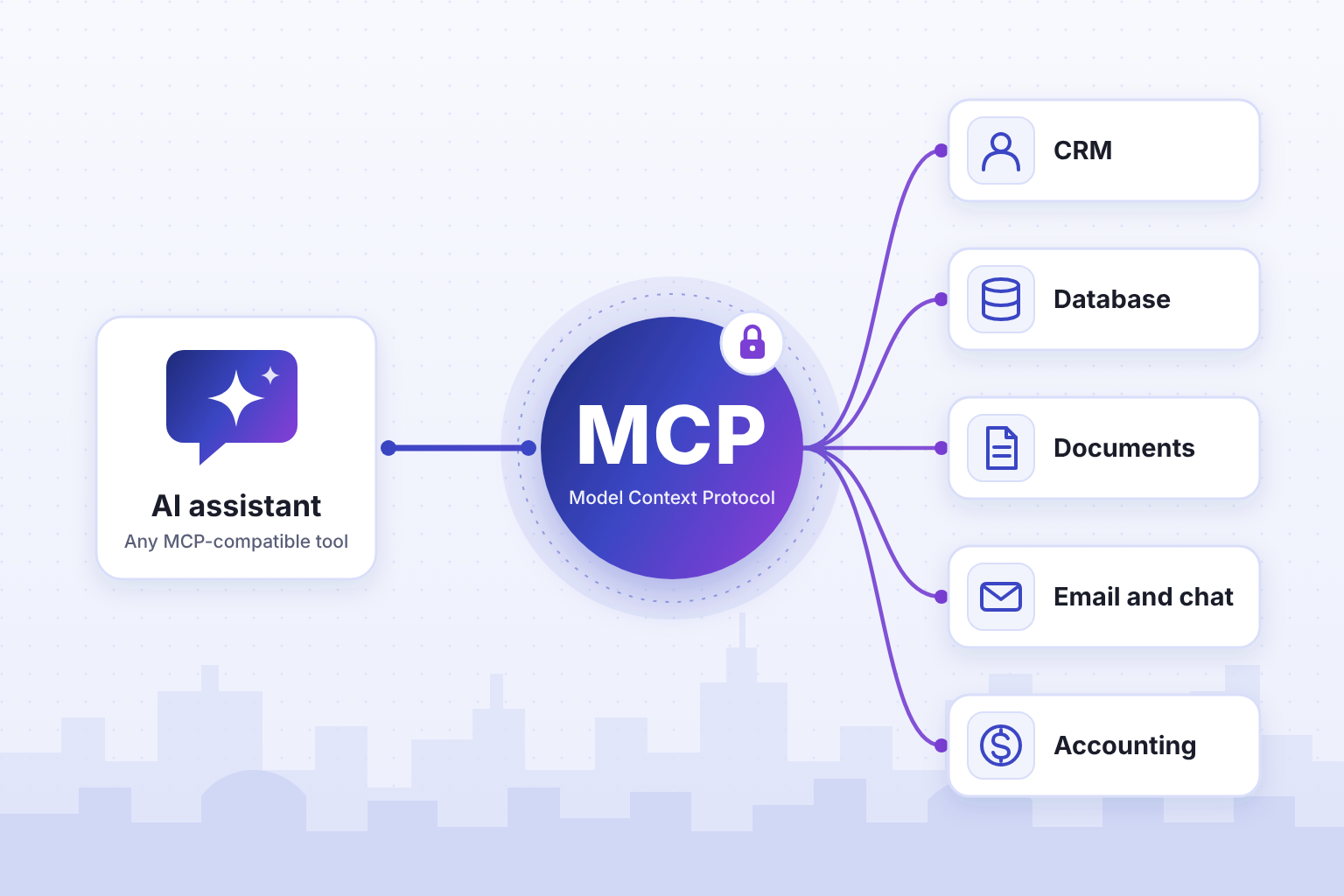
MCP (Model Context Protocol) is an open standard that lets AI assistants securely use your existing business systems, including your CRM, databases, documents, and applications. Anthropic introduced it in 2024 and donated it to the Linux Foundation's Agentic AI Foundation in December 2025, so it is now a neutral standard supported by most major AI platforms.

KEY TAKEAWAYS
Quick Answer
Key MCP capabilities for Kansas City's business transformation:
- Secure AI integration with existing business systems and databases.
- Real-time access to company data without compromising security protocols.
- Streamlined workflow automation across multiple business applications.
- Enhanced AI assistant functionality with company-specific knowledge and tools.
- Standardized protocol reducing integration complexity and development time.
On this page
Understanding MCP Architecture for Business Applications
MCP creates a secure bridge between AI assistants and business systems through standardized connections.
Core architectural components include:
- Secure authentication protocols protecting sensitive business data during AI interactions.
- Standardized API connections enabling seamless integration with existing business software platforms.
- Real-time data access allowing AI to work with current business information and live datasets.
- Tool integration capabilities connecting AI assistants with business applications and workflow systems.
- Context preservation maintaining conversation continuity across multiple business data sources and applications.
MCP functions as a middleware layer that standardizes how AI assistants communicate with external resources. Instead of building a separate integration for every AI tool, you connect a system once through an MCP server, and any AI assistant that supports the protocol can use it. The protocol defines a common way to handle authentication, data formatting, and connection management, which reduces implementation complexity for businesses.
Many mainstream business applications already offer ready-made MCP connectors. Vertical industry software, legacy systems, and in-house platforms usually do not, and that is where a custom MCP server comes in. Either way, the standard means businesses can deploy AI faster while keeping control over data access and user permissions.
Business Integration Capabilities and Use Cases
MCP enables comprehensive business system integration without compromising existing security frameworks.
Primary integration capabilities include:
- CRM system connections providing AI access to customer data and interaction histories.
- Document management integration allowing AI to search and analyze business documents and files.
- Database connectivity enabling AI to query business intelligence and operational data in real-time.
- Communication platform integration connecting AI with email, messaging, and collaboration tools.
- Financial system access allowing AI to work with accounting data and financial reporting tools.
Here is what that looks like in practice. A professional services firm in the Crossroads Arts District can connect an AI assistant to its client management system and draft proposals from historical project data. A manufacturer along the I-435 corridor can connect AI to its inventory system for real-time supply chain insights and predictive maintenance recommendations.
The protocol's flexibility accommodates various business structures and compliance requirements. Organizations in healthcare and financial services can use MCP as well, but the protocol does not make a connection compliant on its own. Compliance depends on how the server is hosted, what data it exposes, and the agreements in place with each AI provider, such as a BAA for patient data.
Security and Compliance Advantages
A well-built MCP server keeps your existing security controls in place while enabling AI integration across business systems.
Security framework components include:
- Authentication layer management ensuring only authorized AI interactions with business data.
- Granular permission controls allowing administrators to restrict AI access to specific data types.
- Audit trail generation providing complete logs of AI system interactions and data access.
- Data encryption standards protecting information during transmission between systems and AI assistants.
- Configuration that supports the compliance requirements of your industry.
A properly built MCP server addresses common security concerns associated with AI integration by implementing role-based access controls and maintaining detailed interaction logs. System administrators can monitor AI data usage in real-time and implement custom security policies based on organizational requirements.
MCP's design lets businesses keep control over their information while enabling AI functionality. Paired with the right hosting and provider agreements, it can support the requirements of regulated industries while providing the flexibility needed for comprehensive AI implementation.
MCP Implementation Phases
MCP implementation follows a structured approach that minimizes disruption to existing business operations.
Implementation phases include:
- System assessment and connector identification for existing business applications and data sources.
- Security configuration and access control setup based on organizational policies and compliance requirements.
- Pilot program deployment with limited scope to test functionality and identify optimization opportunities.
- Gradual rollout expansion incorporating additional systems and users based on pilot program results.
- Performance monitoring and optimization ensuring continued efficiency gains and system stability.
A single custom MCP server typically takes 2 to 4 weeks to build, depending on API complexity and authentication requirements. Connecting several systems takes longer.
The standardized nature of MCP connections particularly benefits mid-sized businesses.
Success factors include thorough system documentation, clear security requirements definition, and stakeholder training on AI capabilities. Businesses that invest in planning and team preparation tend to adopt faster and get more value from MCP. Local groups like the Greater Kansas City Chamber of Commerce are a good place to compare notes with other business owners.
Key Benefits
The benefits of MCP come from removing manual work between systems.
Common benefits include:
- Less manual data entry between systems, since the AI reads and updates records directly.
- Lower integration overhead, because one MCP server works with any AI assistant that supports the protocol.
- Faster answers from live data instead of exports and copy-pasted spreadsheets.
- A complete audit trail of what the AI accessed and changed.
- More time for higher-value work as routine lookups and updates move to the AI assistant.
The standardized approach reduces the technical overhead typically associated with AI system integration, allowing Kansas City IT teams to focus on optimization rather than basic connectivity. This translates to faster deployment timelines and reduced maintenance requirements for businesses throughout the metro area.
The protocol itself is open source, so there is no license fee for the standard. You pay for building, hosting, and maintaining the servers you use, and you gain access to a growing ecosystem of community-developed connectors and tools.
Customer service is often a strong first use case, because AI assistants can access comprehensive customer data in real-time. This enables personalized interactions and faster issue resolution for service-based businesses throughout the metro area.
The protocol's standardized approach reduces the technical expertise required for ongoing maintenance, allowing smaller Kansas City businesses to compete with larger organizations in AI implementation sophistication. Local companies from Prairie Village to Liberty can leverage this advantage to enhance their market position while controlling technology costs, particularly important in Kansas City's competitive business environment.
Implementation Considerations
Successful MCP adoption requires strategic planning and systematic deployment across business systems.
Critical success factors:
- Comprehensive system inventory and integration priority assessment completed at the start of the project.
- Security policy review and access control configuration aligned with organizational compliance requirements.
- Staff training programs ensuring effective utilization of enhanced AI capabilities across departments.
- Phased rollout strategy minimizing operational disruption while maximizing adoption rates.
Planning should include detailed mapping of existing business systems and identification of high-value integration opportunities. Customer-facing systems and operational databases are usually the best place to start, because that is where AI saves the most staff time.
Change management plays a crucial role in successful implementation throughout the Kansas City business community. Teams need training on enhanced AI capabilities and clear guidelines for leveraging new data access features. The most successful deployments include comprehensive documentation and ongoing support structures that facilitate smooth adoption across all user groups.
Getting Started with AI in Your Kansas City Business
360 Automation AI provides comprehensive MCP implementation and AI integration services for local businesses.
Our services include:
- Custom MCP server development for your existing business systems and workflows, typically in 2 to 4 weeks.
- Security assessment and compliance framework development ensuring regulatory adherence across all integrations.
- Staff training and change management support maximizing adoption rates and operational efficiency.
- Ongoing optimization and support maintaining peak performance for evolving business needs.
Ready to transform your Kansas City business operations with MCP? Contact 360 Automation AI today to discover how Model Context Protocol can enhance your AI capabilities while maintaining complete control over your business data and systems.
Want a real answer for your business?
Book a free 30-minute call. We look at your setup and tell you what it would cost and return.
BOOK A CALLFrequently asked questions
How does MCP differ from traditional API integrations for business systems?
A traditional API integration is custom code that links one application to one system. MCP is an open standard, introduced by Anthropic and since adopted by OpenAI, Google, and most major AI platforms, that gives AI assistants one common way to use tools and data. APIs still sit underneath. An MCP server translates AI tool calls into your platform API, with authentication and allowed actions defined once, so it works with any AI assistant that supports the protocol.
What types of business data can AI assistants access through MCP connections?
Through MCP, AI assistants can work with CRM records, financial and accounting data, inventory and order systems, document libraries, email and messaging platforms, and operational databases. Access is permission based. Administrators decide which systems, fields, records, and actions the AI can reach, and existing security policies stay in place. A custom MCP server can also add audit logging so your compliance team can review every AI interaction.
How quickly can businesses see ROI from MCP implementation?
It depends on the workflow. A custom MCP server takes 2 to 4 weeks to build, and the first measurable benefit usually shows up 3 to 5 weeks from kickoff, often when manual data entry between systems goes away. Payback depends on how much staff time the connection saves, so it varies by project. 360 Automation AI estimates the time saved for your specific workflow before you commit.
How much does a custom MCP server cost and how long does it take?
360 Automation AI builds custom MCP servers in 2 to 4 weeks. Initial development costs $6,000 to $12,000 and covers API review, server development, authentication and permissions, testing, audit logging, and team training. Monthly hosting and maintenance runs $500 to $900 and covers secure hosting, uptime monitoring, patches when the vendor changes its API, and support. Price depends on API complexity, authentication method, and how many tools are exposed.
Is my business data secure when AI connects through MCP?
With a custom MCP server built by 360 Automation AI, yes. Connections are encrypted, authentication is scoped, and role-based access controls limit what the AI can touch. Your data stays inside your environment, and the AI reaches it only through tool calls you define. Every interaction is logged with an audit trail your security or compliance team can review. Your existing systems and access controls stay as they are.
More from the blog
See all articles →
Not sure where AI fits in your business?
Book a free 30-minute call. We look at your setup and tell you what it would cost and return.